CyberSmart Technologies has rebranded.
Welcome to Rollcage Defence.

DKIM – Why you need it
DKIM (DomainKeys Identified Mail) is an email authentication mechanism that lets a sending domain sign an email. Think of DKIM as a tamper-evident seal on an email envelope. If someone opens it and messes with the contents, the seal is broken, and the fraud is detected.
The receiving mail server can then verify that:
- The message was authorised by the sending domain, and that
- The message was not modified in transit.

A Primer on e-Signatures
DKIM relies upon public key cryptography, which uses a pair of matching cryptographic keys. This pair comprises a public key which is available to all, and a private key which is completely confidential. Anything which is locked with a private key can only be unlocked with the matched public key (and vice versa).
In our case, the sender generates a small ‘fingerprint’ of the email contents called a ‘hash’. If just a single character is changed in the email, this will completely change the hash. This makes our email tamper-evident.
The digital signature happens when the originating email server uses its private key to encrypt the computed hash for an email, and adds the signed-hash to the email as a signature header. The signature means:
This is exact email that I sent. I have attached a hash of my original email, encrypted with my domain-specific private key to prove it.
– Sending Server
Digital signatures are focussed on tamper-protection, not privacy. For that reason, only the hash is encrypted, and the email message itself is sent in the clear. It is also possible to encrypt the message itself, but we’ll ignore that for now as it has nothing to do with DKIM or authenticity.
DKIM-Signature Header
The sending server creates a public private key pair for its domain name.
The private key is never shared. The sending server calculates the hash for the message, then signs it with the private key and creates the DKIM-signature header:
DKIM-Signature: v=1; a=rsa-sha256; c=relaxed/relaxed;
d=example.com; s=selector1;
h=from:to:subject:date;
bh=Base64BodyHashHere;
b=Base64SignatureHere;
DKIM DNS-based Validation
The sending server must publish the public key to DNS, so that email receivers know how to validate the signature. A DNS TXT record lists the public key using the same ‘selector’, or key-pair label, listed in the DKIM-signature.
The receiving server:
- Extracts DKIM-signature header from the email
- Looks up the public key in DNS
- Verifies the signature
Here’s an example of a DKIM DNS TXT record for example.com
selector1._domainkeys.example.com IN TXT “v=DKIM1; k=rsa;p=MIIBIjANBgkqhkiG9w0BAQEFAAOCAQ8AMIIBCgKCAQEAsomethingverylong…”
| v=DKIM1 | DKIM version (always DKIM1) |
| k=rsa | Key type (RSA is most common) |
| p= | Public key (base64 encoded) |
Why bother with the Selectors
You maybe be looking at that ‘selector’ and the ‘_domainkeys’ subdomain a bit suspiously. They look kinda messy. Are they ‘really’ necessary’?
Well. Yes. The technical name the domainkeys subdomain is a ‘namespace’. This DKIM subdomain gives you a logical space to put your DKIM TXT records, and no one can accidentally mistake DKIM records for anything else. This is helpful because selectors are just key-pair labels. There’s no real naming convention for selectors, its a personal thing. Having a dedicated subdomain keeps things nice and neat.
It’s really important to allow multiple key-pairs, or ‘selectors’, because they allow:
- Key rotation without downtime – Rollout a a new key-pair but keep your old public key in DNS until older emails are delivered.
- Multiple keys for different mail systems – keep your records straight.
- Easy rollback if a key leaks – this is super handy.
How to enable DKIM
Recall that SPF didn’t require any new headers. DKIM is more trickier to enable than SPF for the following reasons.
- A special DKIM-signature header must be added by the sending server. A such you’ll need to enable the service.
- DKIM uses a special subdomain called
_domainkeys. You must publish your DKIM records under this subdomain. - You must carefully manage the custom selector names.
- DKIM is a fail-closed technology. If a DKIM receive cannot valid a DKIM-signature, then the check fails. Missing DNS records would cause a failure.
Microsoft 365 are my email provider so I’ll follow their guidance to enable DKIM. Once enabled, Microsoft creates a public private key pair. I never get to see the private key and that’s exactly how it should be.
The screenshot below if from Micrsoft Defender admin panel. This is currently available at: Policies & rules > Threat policies > Email authentication settings. Microsoft love to move menu options around, so search for DKIM if you can’t find it.
The side nav-bar tells me how to create DNS CNAME records in order to publish the corresponding public keys.
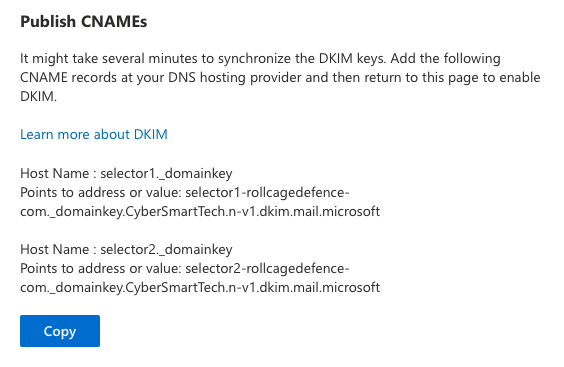
If you follow Microsofts advice and create these records, DKIM will work for you.
⚠️ Warning
Don’t enable DKIM on your sending server unless you have the access to publish the DNS records immediately. The receiving server may reject your email if can’t find the DNS records to validate the DKIM-signature header.
Non-standard Microsoft DKIM
Microsoft does a few surprising things here.
- CNAME instead of TXT records.
- I got caught out here. Microsoft actually publishes their own DKIM Records for you, it just asks you to alias them using CNAME. This eventually resolves to proper DKIM record.
- Non standard ._domainkey.
- The standard says you should look for DKIM record at _domainkeys but Microsoft publishes the CNAME at _domainkey <- Singular (no s). This still works, so I assume that receiving email servers ask for both locations.
- .microsoft top-level domain (TLD)
- This confused me at first because the CNAME looked like a weird text record. If looks weird not to have a .com after .microsoft but Microsoft owns the their own top-level domain.
Takeaways
DKIM is a critical to ensure your company email identity is not easily hijacked. DKIM works in tandem with SPF.
‼️ Note, that both DKIM and SPF – MUST be paired with a strong DMARC policy, set to reject failing checks, or they will have zero impact on your security.
Remember that email security protections should be enhanced in parallel with end-user training. So it’s not technology OR training. The solution is technology AND training. Combined. Rollcage Defence provides email security review services and realistic phishing simulation training powered by SoSafe.