CyberSmart Technologies has rebranded.
Welcome to Rollcage Defence.

DMARC – One protocol to bind them all
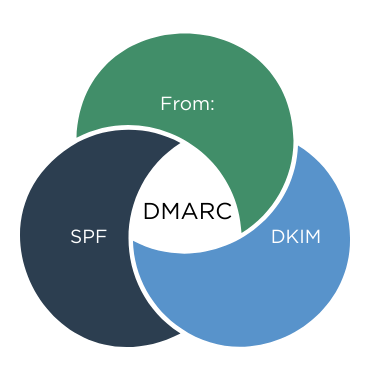
DMARC tells the receiving email server what do when SPF and DKIM policy checks fail. However DMARC performs another vital step. DMARC checks that that the domain of the author, as seen by the end-user fully the domain validated by SPF and DKIM. This is known as ‘alignment’.
✉️ From: “The domain of the email author.’
📋 SPF “Is the connecting allowed to send mail for its domain?”
🔑 DKIM “Was the email changed along the way?”
🚨 DMARC “Align the checks with Authors domain, then enforce policy.”
We’re going to review three critical elements in a received email, then show you how DMARC uses policy to bind it all together.
The end-user view
Emails carry a lot of structured information in ‘headers‘. Most headers are hidden from users. However ‘From:’ header describes the email author and is shown to all email users.
From: “Jane Smith” [email protected]
Lets break it down:
From:
The header type.
“Jane Smith”
An optional friendly “display-name“. The Author can set this to pretty much anything. Email clients prefer show show the display-name, but the email address is always present.
A mandatory field with the author email address. The domain portion is used later by DMARC.
Recap on SPF and DKIM
There are a few pieces of email information which aren’t shown to the user, but are critical to SPF and DKIM checks.
- Connecting IP & Sending Domain
- DKIM-Signature header
Connecting IP
This is the IP address of the email server connecting to our receiving server. SPF needs to know if that IP address is allowed to send email, but it doesn’t know the sender domain yet.
Connecting IP: 203.0.113.45
Sending Domain
We need to know the sending domain for form our DNS query. We snarfle the domain from the bounce email address in the MAIL FROM field [1].
MAIL FROM:<bounce@example.com>
SPF Check
The receiver now has enough information to run the SPF check. It runs a DNS TXT query:
IS 203.0.113.45 authorised to send on behalf of example.com?
YES!. SPF records the result into an ‘Authentication-Results’ header in each received message:
Authentication-Results: mx.receiver.net;
spf=pass smtp.mailfrom=example.com;
DKIM-Signature
The ‘DKIM Signature’ header added by the originating email server as a seal of authenticity for the associated domain – example.com
DKIM-Signature: v=1; d=example.com; s=key1; …
DKIM Check
The receiving server runs DKIM checks against the domain listed (d=) in the DKIM-signature. The receiving server appends the result of it’s check into an ‘Authentication-Results’ header:
Authentication-Results: mx.receiver.net;
spf=pass smtp.mailfrom=example.com;
dkim=pass header.d=example.com;
DMARC in three steps
Thanks for waiting so patiently. Lets talk about how DMARC does it’s thang in three easy steps.
1- Check that SPF and DKIM passed
That’s pretty easy – read the Authentication-Results header. If both SPF and DKIM have passed got to Step 2 – Alignment.
If either one of them has failed, there no point in checking for alignment, it’s time to act (step 3).
2 – Check for Alignment
Alignment is at the heart of DKIM and converts SPF and DKIM from useless checks into workhorses.
Alignment checks that the domain shown to the user in the From field matches the domains checked by SPF and DKIM.
In the example below we see that SPF can technically ‘pass’ but still provide not protection.
MAIL FROM: attacker.com ← SPF passes. The mail really did originate from attacker.com.
From: [email protected] ← User sees this. Looks good!
Similarly DKIM just validates that the signature is legitimate, yet the From: address is spoofed.
DKIM-Signature: Signed-by attacker.com. ←DKIM-Signature is legit. DKIM doesn’t care who signed it.
From: [email protected] ←User sees this. Looks good!
We can clearly state that SPF and DKIM checks are useless without checking those validated domains align with the sender ‘From:’ address.
3 – Act
Without DMARC, SPF and DKIM will just populate their information into the ‘Authentication-Results header and take no action. The email receiver will respond with ‘noted’ and the email will still be delivered. in short, it’s a bit shit.
You must summon the power of DMARC to tell the mail receiver how to handle SPF and DKIM failures. If you’ve configured SPF and DKIM, then DMARC shouldn’t be too scary.
DMARC Record format
_dmarc.example.com TXT “v=DMARC1; p=reject; adkim=s; aspf=s; rua=mailto:[email protected]“
Let’s break down this record into its component parts.
_dmarc.example.com TXT “v=DMARC1
Okey dokey. So we can see that DMARC:
- Uses DNS TXT Records
- Uses aspecial subdomain (namespace) called _dmarc.
- requres that records being with v=DMARC1
p=reject
P is for Policy. We have three options:
- Reject. This is the only secure option.
- Quarantine. Threat failing checks as ‘suspicous’, and place email in spam folder.
- None. Will report on DMARC checks only, takes no action. Not secure but valuable for migration.
adkim=s; aspf=s;
A is for Alignment. s is for strict and r means relaxed.
- adkim=s means the ‘DKIM alignment’ is strict. The DKIM Authenticated domain must match exactly with the From: domain
- aspf=s means the SPF alignment = strict, the ‘MAIL FROM / Return-Path’ must exactly match the From: domain.
- Relaxed mode (r) is the default and regards mail.example.com as aligned with example.com
rua=mailto:[email protected]“
Rua means Reporting URI for Aggregate reports. You normally setup an email alias for [email protected] and DMARC receivers will send you reports, when they feel like it. If they feel like it. These reports are valuable when you have p=none, so that you tune your policy, and get to p=reject ASAP.
It’s important to note that many email service providers simply wont send you Aggregate reports.
Takeaway
Thank you so much for following along as we journeyned through email security protocols. Together we have reviewed SPF, DKIM and now DMARC and demonstrated how they work together. They are a powerful trinity in our fight against email fraud and email attacks.
It’s worth remembering that email security isn’ta choice between technology OR training. The solution is technology AND training. Rollcage Defence provides email security review services and realistic phishing simulation training powered by SoSafe. We’d love to hear from you.
[1] Envelope’ refers to SMTP protocol fields such as MAIL FROM, which are used for transport and bounce handling and are distinct from message headers like From: and DKIM-signature which belong to the message itself.