CyberSmart Technologies has rebranded.
Welcome to Rollcage Defence.

What is ARP?
ARP is a technology that underpins most networking and network security operations. There are so many primer and explanations out there already. So rather than pursue the traditional route, I wanted to explore an alternative method and explain it by analogy. I wanted to experiment with an analogy to What App messaging – and called the analogy WhatsARP?
ARP is a fundamental networking protocol, and stands for Address Resolution Protocol. It is used when a message is received by a computer with a destination IP address.
In our analogy the computer (blue) knows that a computer with that IP Address lives somewhere locally, but doesn’t know exactly where. It needs to learn the destination MAC address to add when it packages the layer-3 ‘packet’ into a layer-2 ‘frame’.
How to message them if don’t know their number?
In the analogy below, Our blue laptop wants to send a message to the Green laptop, with a IP address 192.168.1.5. The computer needs to find out the MAC address of a computer but can’t message it to ask…. well. … because it needs the MAC address to send it a direct message. Infinite loop.
In this analogy we’ll assume that everyone on the local IP network belongs to the same group chat. The solution here is simple but noisy. Send an ARP Request as a layer 2 broadcast to ‘all stations MAC address ‘ff:ff:ff:ff:ff:ff:’ This ask everyone in the chat:
‘hey are you using the ID 192.168.1.5, if so, just respond with your direct number (MAC address).’
That ARP request also included the Sender IP Address. All stations that received that broadcast can update their ARP cache with the senders MAC and sender IP. Magic.
Everyone knows the MAC address of the sender. When the current owner of IP address 192.168.1.5 replies with its MAC address: , it can send the reply as unicast, directly to the MAC address it saw in the ARP request. 0000:1111:1234
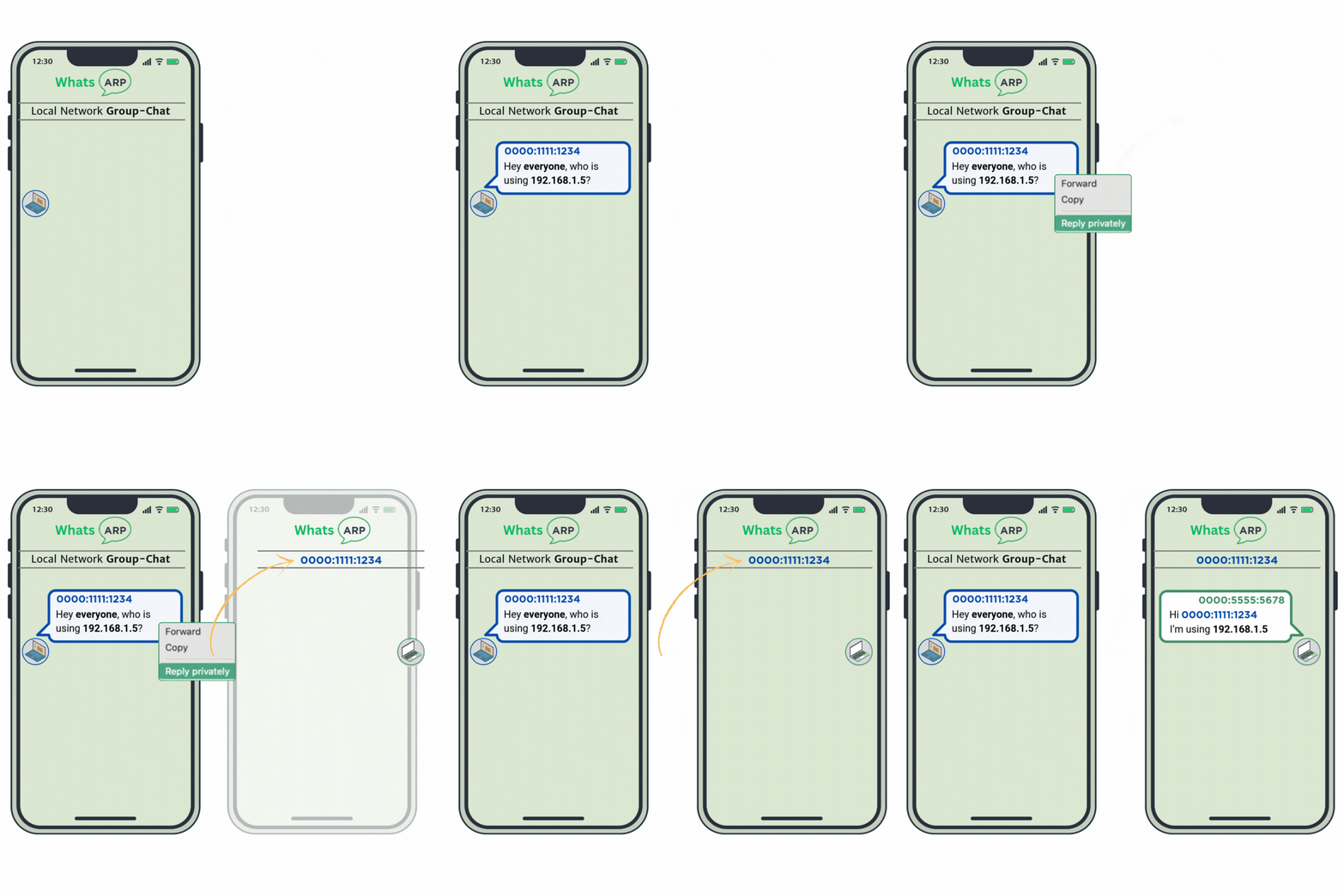
Once both parties have each others MAC address they can continue to message directly without disturbing their colleagues. There’s no need to re-ARP while the conversation is in progress. They have found each other’s MAC address now and can talk about golf, fashion, MMA or GAA to their hearts content, without disturbing anyone else.
Take away
This was a a fun experiment. Learning how to use Canva.com to create GIPHY animations. When I posted this on LinkedIn I received a ton of feedback, but mainly comments that the animation was too fast.
I wil definitely explore the use of GIPHY animations in the future, however I think it would be as a complement to traditional explanations rather than as a replacement.